The Events area enables you to track past and upcoming events and register for new opportunities to engage and grow.
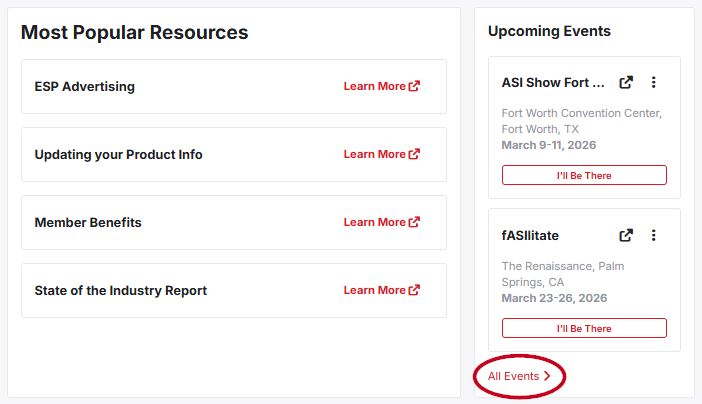
On the ASI Supplier Central homepage, the "Upcoming Events" section highlights the next two events on the calendar. Click on the "All Events" link to access the main events area.
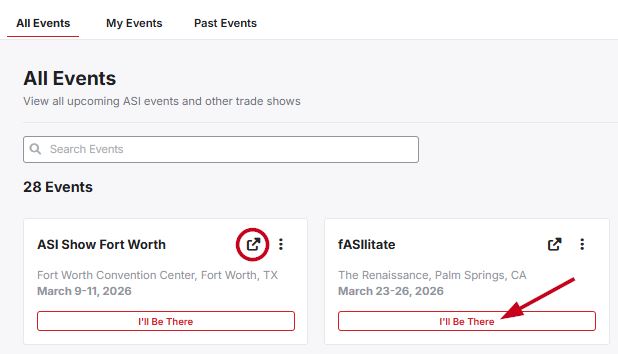
In the Events area, you will be able to view all upcoming ASI events and other trade shows. There are three sections for Events:
- All Events: View all upcoming ASI events and other trade shows
- My Events: Track ASI events and other trade shows you will be attending
- Past Events: View past events
Each event is displayed as a tile with the ability to open the event details in a new tab or indicate your commitment to attend by clicking on the "I'll Be There" button.
Add Event
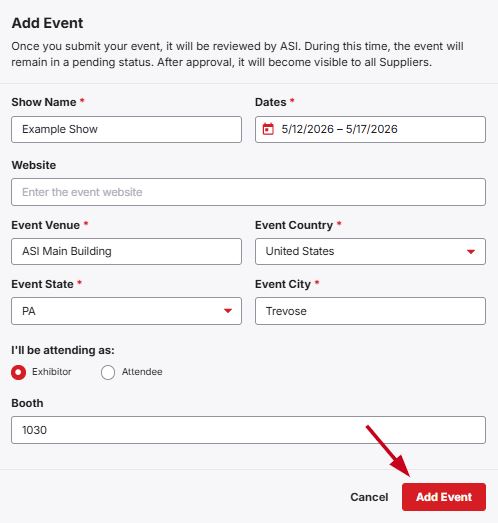
To add an event, click on the "Add Event" button. Then, fill in the information in the "Add Event" window.
When you are finished, click on the "Add Event" button. It is important to note that a submitted event will be reviewed by ASI. During this time, the added event will remain in a pending status. After approval, it will become visible to all Suppliers.