


The "Pages" section enables you to add, edit, and delete pages for your website, as well as create custom pages and manage the site navigation.
In the "My Pages" area, all available pages for your site will be listed alphabetically. To add or update a standard (Home, About Us, and Contact) or custom page, click on the three-dot icon and then click on Edit.

What would you like to do?
Add Custom Page
Click on the "Add Custom Page" button.

A window will open where you can enter the Page Name and Slug. As you type the page name, the slug will be automatically generated based on the page name text. The slug is the URL friendly version of the page name and appears in the address bar when visitors to your site are viewing that page. It is usually all lowercase and contains only letters, numbers and hyphens. You can choose to update the slug if you like or use the one provided. When you are ready, click on the Add Page button.
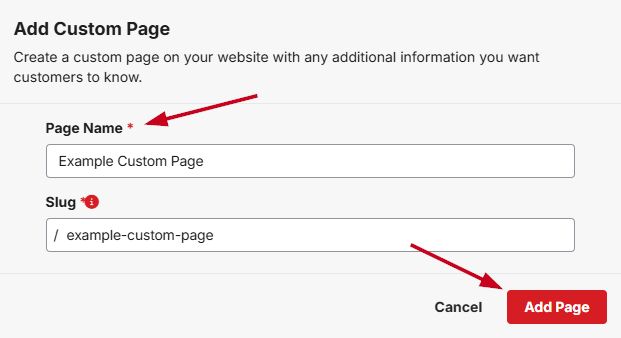
The page will now be listed in the My Pages area. Click on the three-dot icon and select Edit to add and/or update the elements on the page.
Manage Navigation
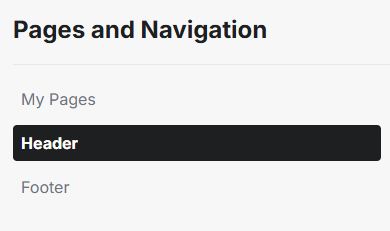
In the "Header" and "Footer" subsections of the "Page"s tab you can update the available options for each site menu. Click into the section for the navigation menu you would like to update.
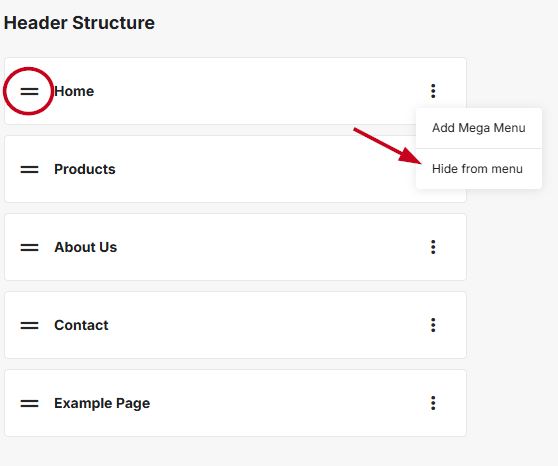
The menu structure will contain all enabled pages on your website. Use the two lines icon to reorganize the pages and links in the menu. If you would like to create a subpage, use the two lines to drag the page and drop it slightly indented to the main page. To hide a page from the navigation, click three-dot icon and click "Hide from Menu".
Add Links to the Site Navigation
To add links to your navigation, click on the down arrow on the "Add Custom Page" button and click on "Add Link".

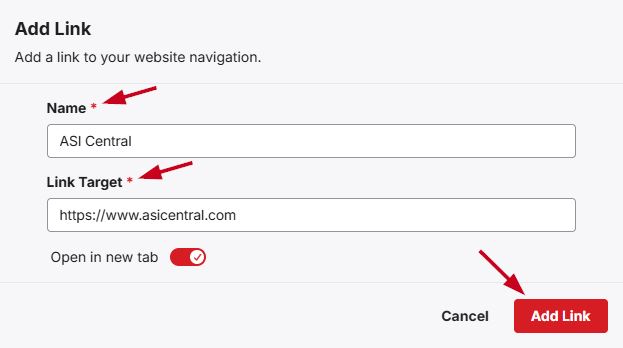
In the "Add Link" window, type the name to be displayed in the navigation menu in the "Name" field and enter the URL in the "Link Target" field. Use the slider to indicate if this link should open in a new tab. Then, click on the "Add Link" button.
When you are finished modifying the structure, click on the Publish Site button.
